An app for tracking calories and weight, made for Serbian food. You log a meal with a photo, your voice or the nutrition label. It works out how much you really burn from your weigh-ins, so it doesn't have to rely on a formula.
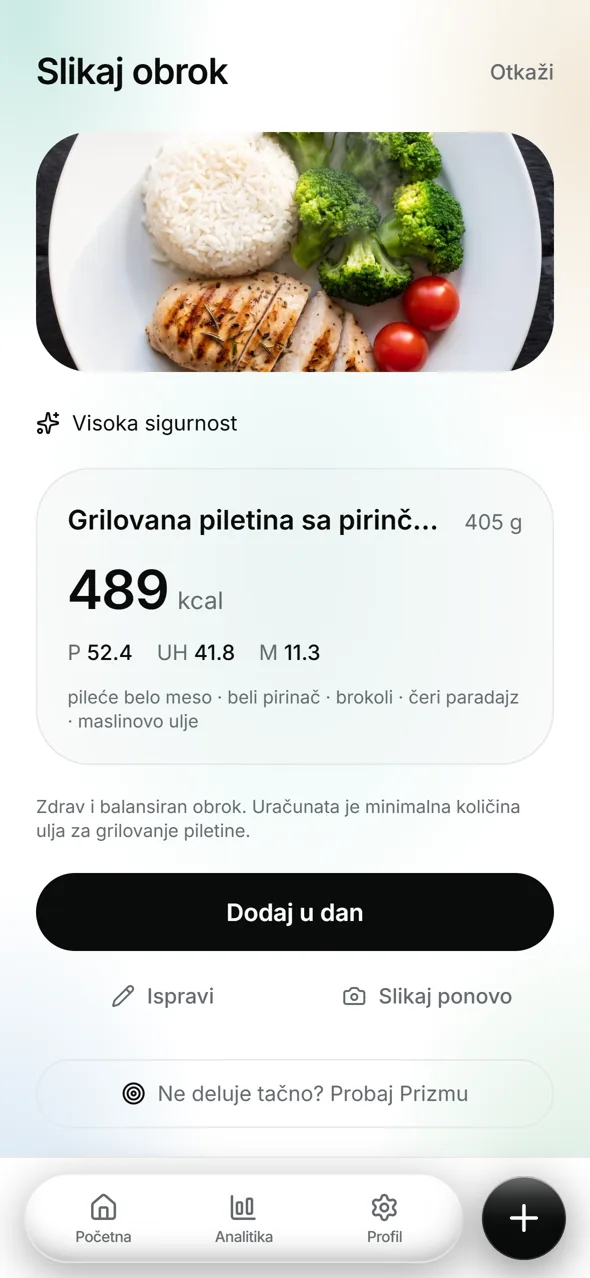
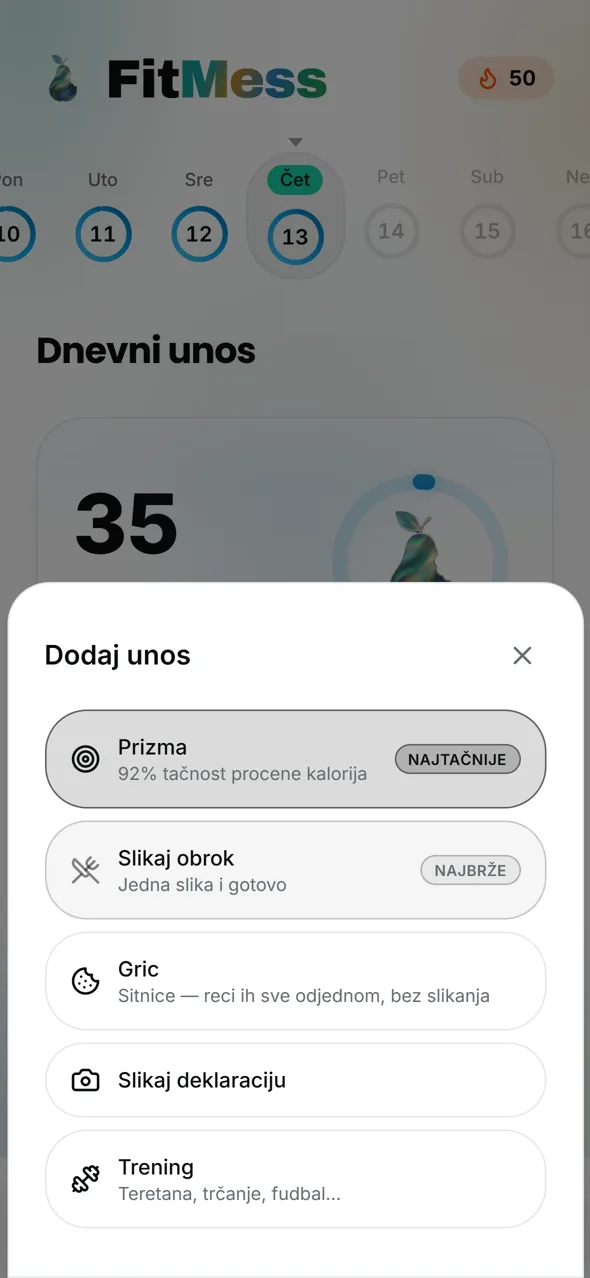
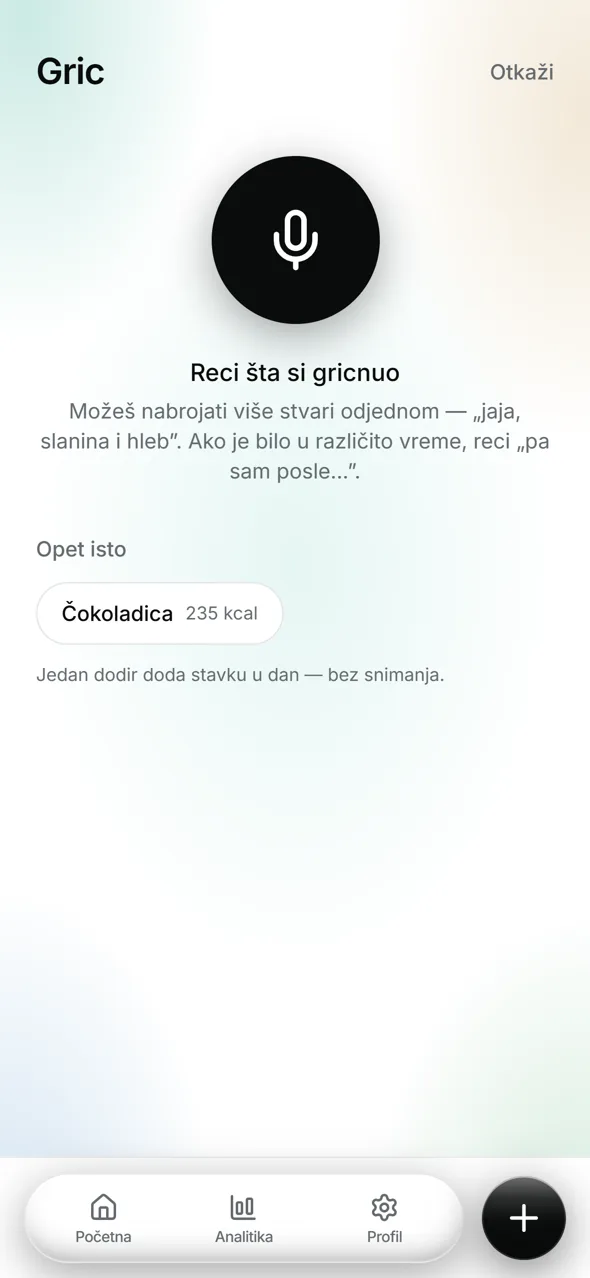
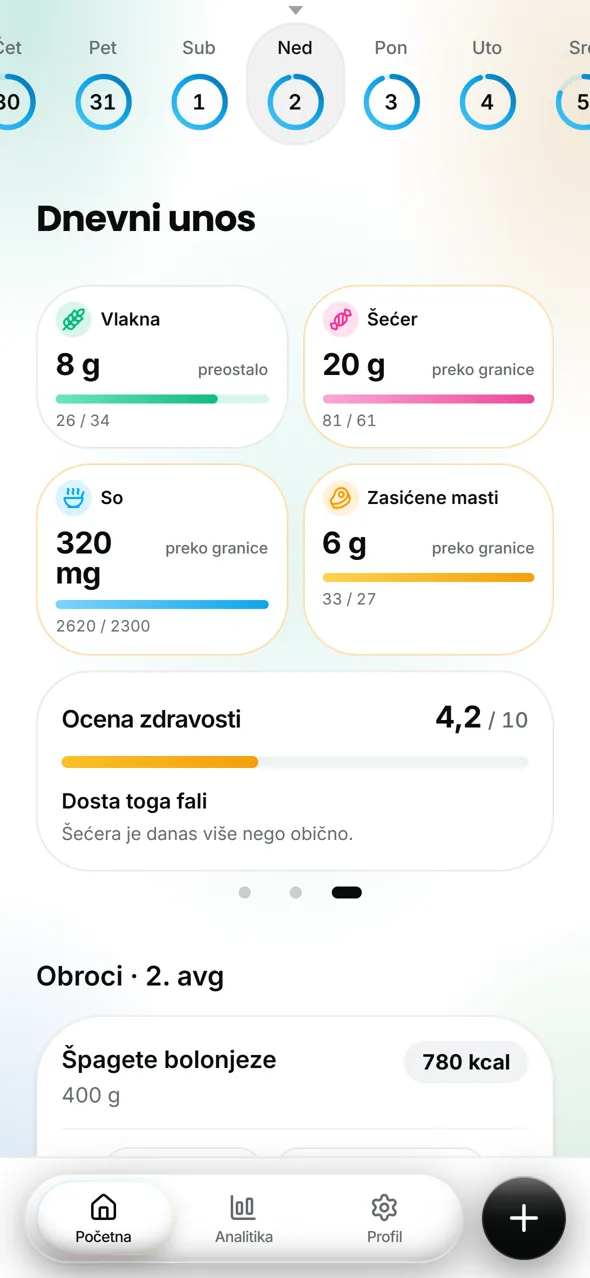
“Calories are maths.” My own screen recording of Prizma, uncut, framed in a phone.Home: daily intake and macrosPhoto meal: result with ingredientsFive ways to log a mealGric: log snacks by voiceMicronutrients and health scoreAnalytics: the week at a glance
Why I built it
I’m a big fitness fan. I wanted to go on a diet, but I struggled with consistency and with living in that constant grind. So I researched calories and realised you won’t gain weight as long as you don’t eat more than you burn, and I thought: why not build this for the mainstream?
Using scientific studies pulled from PubMed, which are stored in the database, I made it so users enter their details and get their daily intake calculated: calories, protein, fat and carbs. I added an AI model that I tested and trained with prompts to give results as accurate as possible, on Serbian dishes.
The idea
Most calorie apps quietly become judges. A missed day turns red, the week becomes a failure, and the easiest way to stop feeling bad is to delete the app. My sentence for the project was simple: I don’t want it to be just another calorie tracker.
So FitMess is an instrument, like a Whoop, and not a plan. A plan is something you can fall off; an instrument just tells you about yourself. Every feature had to pass one test: does this tell users something about themselves, or tell them what to do? The first builds habit. The second builds guilt.
Two more rules followed from that. The week, not the day, is the unit of success, so one heavy dinner never ruins anything. And the app should measure you, not assume: formulas are only a starting point until your own weigh-ins say otherwise.
Timeline
First commit. Next.js, Supabase and a written product spec.
Dropped my multi-agent orchestration setup: too slow for this project. Switched to building feature by feature with one agent per task.
First AI food-photo estimate with Gemini, straight REST calls with a strict JSON schema.
Prizma: photo logging becomes a two-step conversation with the model.
Weekly measurement and “day trust”: the app starts measuring energy use instead of guessing it.
Two launch videos made in a motion-graphics studio built with Claude Code.
Start of the App Store and Google Play work: native shell, push, legal pages.
Google Play closed testing goes live.
Approved on the App Store after two rejections.
Decision to rewrite the interface as a real React Native app. Backend, formulas and data stay.
Every feature
01
Adaptive week
Eat over your target and the difference is spread over the remaining days of the same week. What doesn’t fit rolls into the next one. The daily cut is capped at 25% and never drops below 1,400 kcal for men or 1,200 kcal for women. The logic knows your goal: when you are cutting, eating less never raises later days, but when you are gaining, it does. The card explains why the number moved, and suggests a walk sized to your weight.
02
Day trust
The most important rule in the engine: absence of data is not data. A day with one forgotten 122 kcal entry used to count as a real 122-kcal day and pushed every later day up. Now days the app can’t trust are treated as on-plan and never read at their logged number.
03
Prizma
A photo can’t see portion size or how food was cooked, which is where photo logging goes wrong. Prizma turns it into a short conversation. You take up to five photos (two angles recommended, a fork in shot for scale), the model either answers straight away or asks targeted multiple-choice questions about what it can’t see, and you can answer by tapping or with one voice note. The result is broken down by ingredient, each with its own grams, instead of one number.
04
Photo meal, Gric and nutrition labels
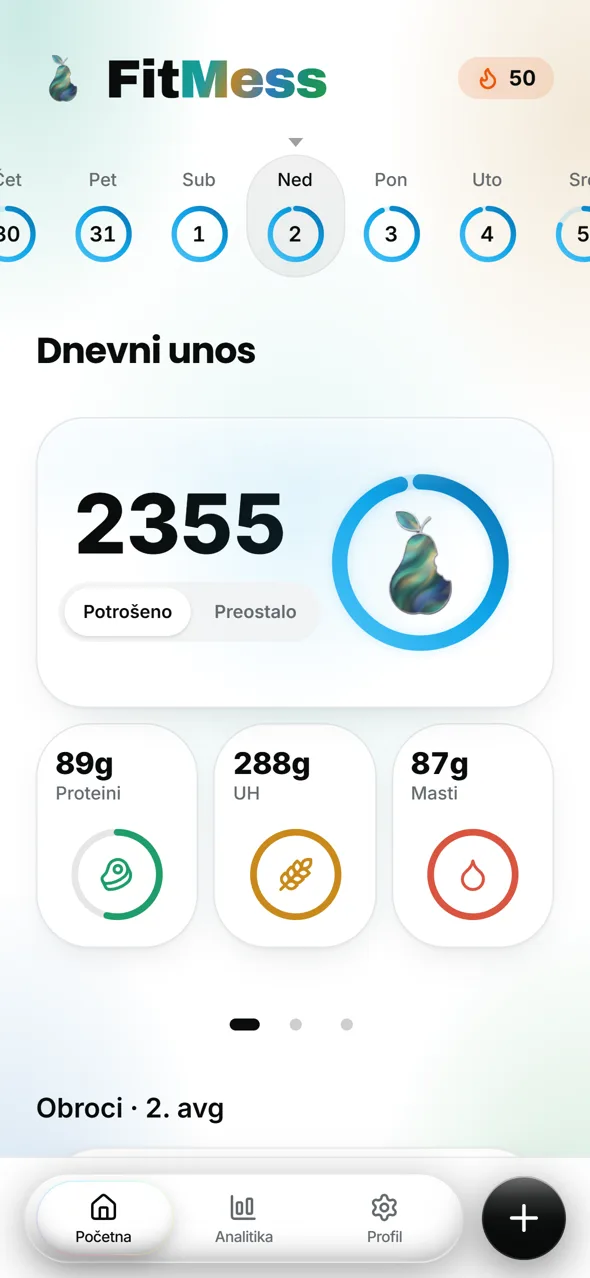
Five ways into the same day: Photo meal (one photo, done), Prizma (most accurate), Gric (say every snack out loud at once: “two eggs, bacon and bread”), Nutrition label (reads per-100 g values and scales them to what you ate) and Workout. After logging you can add one more portion without a new photo, or slide “I didn’t eat it all” on the meal card.
05
Hidden fat
People under-count, and the error collects in cooking fat: oil doesn’t show on a photo, and breaded food carries 30–40% more calories. Rules for it live in one shared module and go into the meal, voice and snack prompts. They are deliberately kept out of nutrition labels, where the printed value already contains all the fat, and out of Prizma, which asks about preparation instead of guessing. Tests lock both exceptions.
06
Weekly measurement
The app stops guessing your energy use from a formula and measures it from your weight trend plus what you ate. It never reacts to a single weigh-in: a trend appears after two, a suggestion only after three. Jumps from water or glycogen fall outside a plausibility band and are shown but not acted on. The app only suggests a new target, and you tap to accept it. Gemini writes the sentence, never the numbers.
07
Micronutrients and health score
A second page on Home shows fibre, sugar, salt and saturated fat against daily limits, plus a simple health score for the day. Missing values are treated as unknown, never as zero, so the score doesn’t flatter a day with incomplete data.
08
Analytics
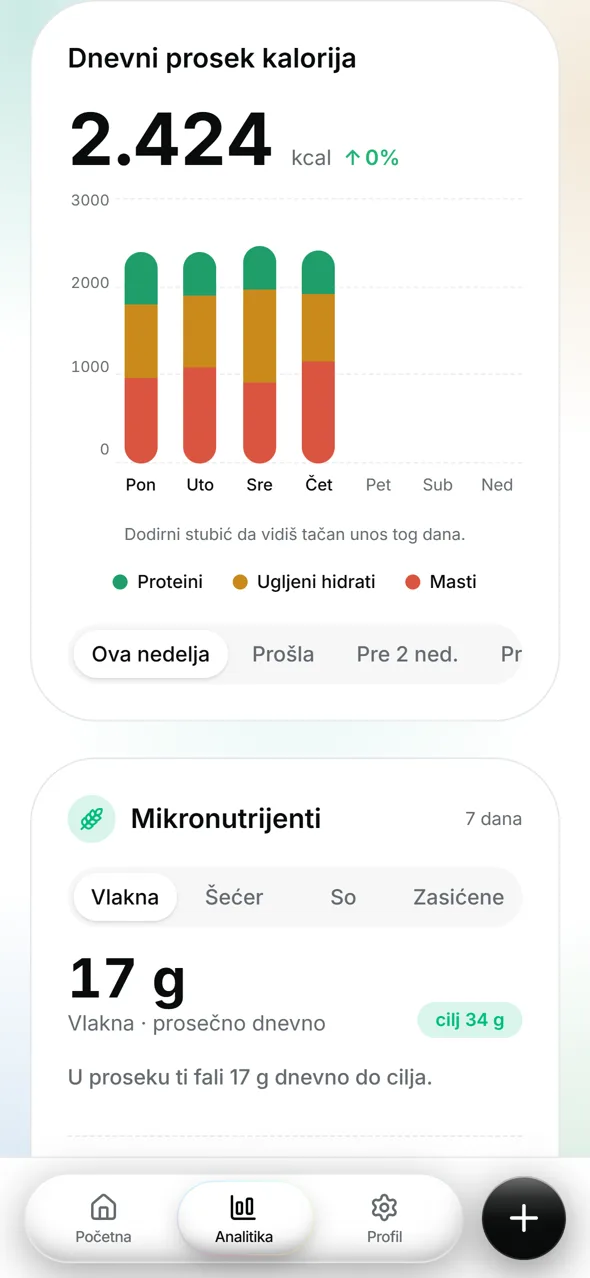
Daily average intake with a stacked macro chart per day, micronutrients over seven days, BMI and weight trend. Tap a bar to see that day. Built from existing logs, no extra tables.
09
Workouts, water and steps
Log a workout and see “resting (BMR) + workout = burned today”. A logged workout never adds calories to your budget: the activity multiplier already pays for 3–5 sessions a week, and adding them again is the most common way a calorie app quietly makes people gain weight. Burn is counted net (MET − 1). Step goals follow your activity level instead of a flat 10,000.
10
Reminders, habits and rewards
Web push and native push: a morning note and an evening summary with the real remaining number, plus a reward screen for three meals in a day. Streaks are derived from rewards, never stored. A daily habit checklist replaced an old “diet rules” page nobody used.
11
Your data
“My data” shows everything before you download it. Any new table that holds user data must be registered for export, and a test fails if it isn’t. Account switcher, legal pages for privacy, terms and account deletion, and explicit consent for health data at sign-up.
AI architecture
Models: Gemini for meal photos, voice and labels, called directly over REST with a strict response schema and no SDK version risk. Each flow’s model is a server setting, not code, so comparing Flash against Pro on accuracy is a config change, never a deploy.
Numbers come from code. BMR, TDEE, the adaptive week and the weekly measurement are deterministic functions with tests. The model only writes the sentence around a number and falls back to a template if the call fails.
Validate the shape, not just the values. Gemini 3 returns its reasoning as extra parts marked thought: true. Joined blindly, those notes reached a user’s screen as “Status TOO_SLOW explained: Yes”. Thought parts are now filtered, and every output is validated before use.
Charge per user action, not per API call. Prizma makes two model calls for one meal. Counting HTTP calls would have made the “5 free a day” promise false, so the quota is charged once per action, in each of the six AI flows, and a test checks that every flow does it.
Getting into the stores
App Store: two rejections. The first came because the shell opened on the marketing page. The second cited guideline 4.8, since Google sign-in needs an equal alternative, so I added Sign in with Apple. It also cited 1.4.1: the app calculates BMR, TDEE and BMI, and the scientific sources lived only in code comments. I made them visible in the app. Approved on 23 August 2026.
Google Play: closed testing live on 15 August in 177 countries. Testers join through a Google Group instead of a list of emails, so one link is enough. I learned the hard way that joining the group counts as opting in, not installing, and that Play can take a night to recognise a new member.
Builds run on Codemagic for both platforms. The native shell is Capacitor with push, Google and Apple sign-in, and safe-area handling that has exactly one owner.
Pricing model
Free forever with up to five AI estimates a day, and a subscription for people who want more. It’s not a trial. Version 1 sells only through the App Store and Google Play (RevenueCat as the single layer), because selling on the web inside a remote shell adds risk for no proven gain.
Security was the interesting part. No user can write to the entitlement or usage tables. The counter moves only through one database function that reads the user id itself and increments atomically, so two fast taps can’t both read 3 and write 4. The limit is built but deliberately switched off. It goes live together with the paywall, never before, and a test fails if anyone turns it on alone.
What’s next
FitMess is on hold for now, with the backend asleep. The plan for its return is already decided: the interface gets rebuilt as a native React Native (Expo) app with a full redesign, while Supabase, security rules, 37 API routes, every formula and every migration stay. The web version taught me what a native app has to feel like from day one: instant start, haptics, native navigation and a proper keyboard.
What I decided
“Instrument, not plan.” Anything that makes users feel judged is cut.
The week is the unit of success, not the day.
Energy use is measured, not assumed.
Workouts never add calories to the budget.
Free tier stays free forever.
What the AI did
Built the Next.js app, the adaptive engine and the tests.
Handled the native build chain (Codemagic, signing, push).
Wrote the AI prompts and schemas.
Built the motion-graphics studio and both launch videos.
Where I corrected it
Treated a missing log as real data. I introduced day trust.
Let the model’s hidden reasoning reach the screen. Now it only writes words, and every output is validated.
Planned to count the AI quota per API call. I moved it to per user action.
The first launch video was a slideshow of screenshots. I asked for real interaction: the finger taps, the slider moves, one continuous camera.